Your One-Stop Shop for Engineering, Electromechanical & Construction Tools


Your One-Stop Shop for Engineering, Electromechanical & Construction Tools
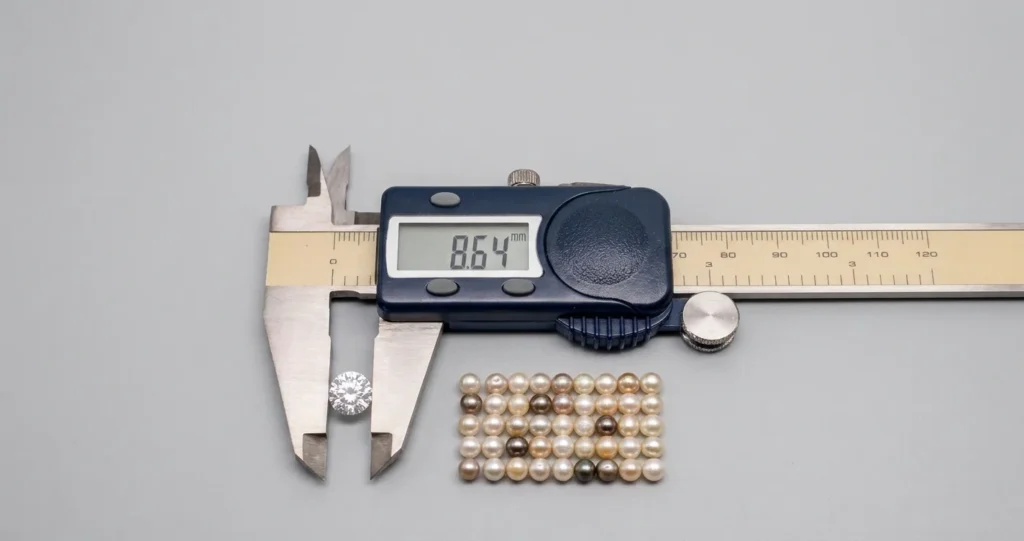
A digital vernier caliper measures the external dimensions, internal diameters, depths and step dimensions of different components. Accurate results depend on cleaning the measuring surfaces, checking the zero setting, selecting the correct jaws and positioning the instrument properly. This guide explains how to take measurements, avoid common mistakes and maintain accuracy.
A digital vernier caliper is a useful measuring tool for checking the dimensions of different components. It can measure external dimensions, internal diameters, depths and step measurements. Unlike traditional measuring tools, it displays the results on an LCD screen, making measurements easier to read and record.
Getting accurate results depends on how the instrument is used. Cleaning the measuring surfaces, checking the zero setting and positioning the jaws correctly can help prevent measurement errors. This guide explains how to use a digital vernier caliper, understand its main parts and take accurate measurements for workshop and industrial applications.
A digital vernier caliper is a precision measuring instrument used to measure the length, thickness, diameter and depth of different objects. It has an LCD screen that displays the measurement directly, so users do not need to read scale markings or calculate measurements manually.
The instrument has different measuring features for checking outside dimensions, inside diameters, depths and step measurements. Most digital models offer a resolution of 0.01 mm, allowing users to take precise readings for routine inspection work. It is commonly used in manufacturing, engineering workshops and quality-control departments where accurate component measurements are important.
Before learning how to use a digital vernier caliper, it helps to understand its main components. Each part performs a different measuring function.
Understanding these parts helps operators select the correct measuring surface instead of using the external jaws for every application.
Using a digital caliper correctly requires more than placing its jaws around an object. The instrument must be clean, properly zeroed and aligned with the surface being measured.
Follow these steps to obtain consistent readings.
Start by checking that the measuring jaws and workpiece surfaces are clean. Dust, metal chips, oil and coolant residue can create small gaps between the measuring surfaces and affect the result.
Use a clean, lint-free cloth to wipe the jaws and the area being measured. Check for visible damage, burrs or scratches that could interfere with contact.
Press the power button to switch on the instrument. Close the external measuring jaws gently until their faces make proper contact.
Check the LCD display. It should show 0.00 mm when the jaws are fully closed. If the display shows another value, clean the contact surfaces again and press the zero button.
Do not start measuring until the zero reading is consistent. If the instrument cannot return to zero, inspect it for damage or arrange a calibration check.
Choose the measuring surface according to the dimension you need to check.
Selecting the correct part of the instrument helps prevent incorrect positioning and unnecessary measurement errors.
Place the workpiece between the appropriate measuring surfaces. Keep the caliper aligned with the dimension being checked.
For an external measurement, bring both jaws into contact with opposite sides of the component. For internal measurements, open the smaller jaws until they touch the inside walls.
Move the slider gently using the thumb roller. Apply enough pressure to establish contact without squeezing or bending the instrument.
Once the jaws are correctly positioned, check the LCD display. Allow the reading to stabilise before recording it.
For repeated inspections, record each reading against the relevant part number or inspection reference. If the model supports data output, compatible equipment can help transfer readings into a measurement or quality-control record.
Take another reading to check consistency. If the values differ noticeably, inspect the alignment and contact surfaces before accepting the result.
A digital caliper can perform several types of measurements without changing instruments. The important part is using the correct measuring feature for each task.
Open the larger jaws and place the component between them. Bring the jaws together until they make light contact with the opposite outer surfaces.
Keep the caliper perpendicular to the measured dimension. This method works for checking the thickness of a metal plate, the diameter of a shaft or the width of a manufactured component.
Insert the smaller upper jaws into the hole or opening. Open them gradually until both measuring faces touch the internal walls.
Keep the instrument straight and avoid tilting it inside the opening. For circular holes, a slight adjustment in position can help identify the true internal diameter.
Place the end of the caliper firmly against the top surface of the workpiece. Extend the depth rod until its tip reaches the bottom of the hole or recess.
Keep the beam perpendicular to the surface. A tilted instrument can produce a depth reading that does not represent the actual distance.
Position the rear step measuring surfaces against the two levels being compared. Extend the slider until both surfaces make proper contact.
This method is useful when checking shoulders, recessed sections and differences in component height.
Digital calipers make unit conversion straightforward. Most models include an mm/inch button that changes the displayed measurement between millimetres and inches.
For example, a measurement of 25.40 mm is equivalent to 1 inch. Pressing the unit button changes the displayed unit without requiring manual conversion.
When recording measurements, remember these two terms:
These values are not interchangeable. A caliper displaying two decimal places does not automatically guarantee an accuracy of ±0.01 mm.
Always check the manufacturer’s specifications and compare the stated accuracy with the tolerance required for your inspection work.
Even when operators understand how to use a digital vernier caliper, small handling mistakes can affect measurement results.
Watch out for these common problems:
For critical inspection work, take repeated readings and compare them with the instrument’s specified accuracy and the component’s permitted tolerance.
Regular care helps maintain consistent performance and extends the working life of a digital caliper.
For production environments, maintain calibration records and remove instruments from service if they have been dropped, damaged or found to produce inconsistent readings.
Knowing how to use a digital vernier caliper correctly helps technicians measure components more consistently and identify dimensional variations during inspection. Cleaning the jaws, checking the zero setting, selecting the correct measuring surfaces and maintaining proper alignment are essential steps for reliable results.
The right instrument also matters. Al Sakeena Building Materials and Electricals Trading provides access to INSIZE measuring instruments for manufacturing, engineering and workshop applications. Explore its precision and measuring tools to find suitable instruments for your measurement requirements.
Get the right caliper for your measuring work
Not sure which caliper fits your work? Tell us what you measure and how accurate it needs to be. We will recommend a suitable model and send a straightforward quote.
A vernier caliper requires manual scale reading, while a digital caliper displays measurements directly on an LCD screen. Digital models are faster, easier to read and reduce measurement errors.
A micrometer is generally more accurate and offers finer resolution, often 0.001 mm. A caliper is more versatile for measuring internal, external, depth and step dimensions.
Choose a measuring range slightly larger than your biggest workpiece. A 150 mm caliper suits general use, while 200 mm and 300 mm models are better for larger components.
This can happen due to a weak battery or dust and moisture on the measuring beam. Replace the battery, clean the tool and reset it to zero before use.
Whether you measure small metal parts or large industrial components, choosing a caliper with the right measuring range makes inspection easier. INSIZE offers a variety of digital calipers for different applications. Explore the following INSIZE digital caliper models available from Al Sakeena to find the right option for your measuring needs.